A vario app as elegant and clear as paragliding itself.

SCROLL

Reliability through simplicity
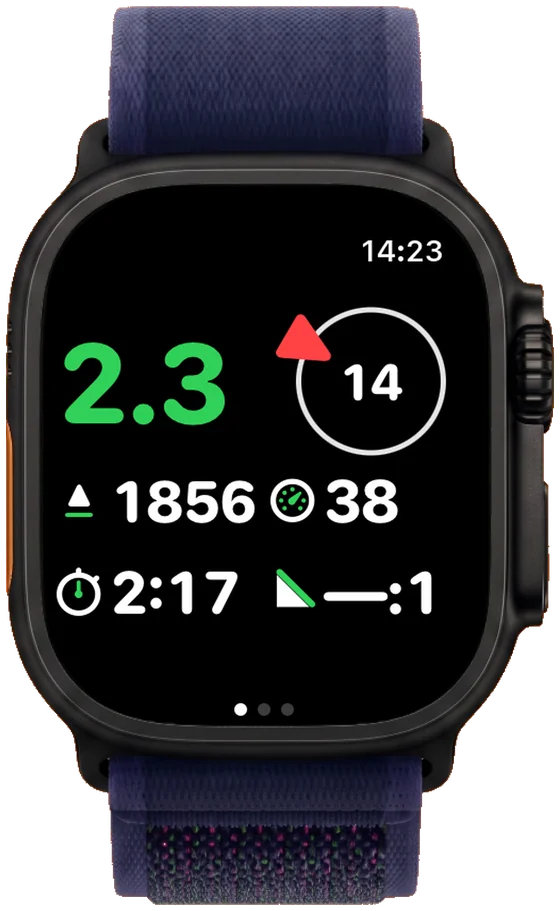
SimpleVario main screen on Apple Watch Ultra: climb rate, wind direction, altitude, flight time and glide ratio

Main Screen

Climb and sink rate, wind direction and speed, altitude, ground speed, flight time and glide ratio: the main screen shows everything that matters in flight, at a glance.
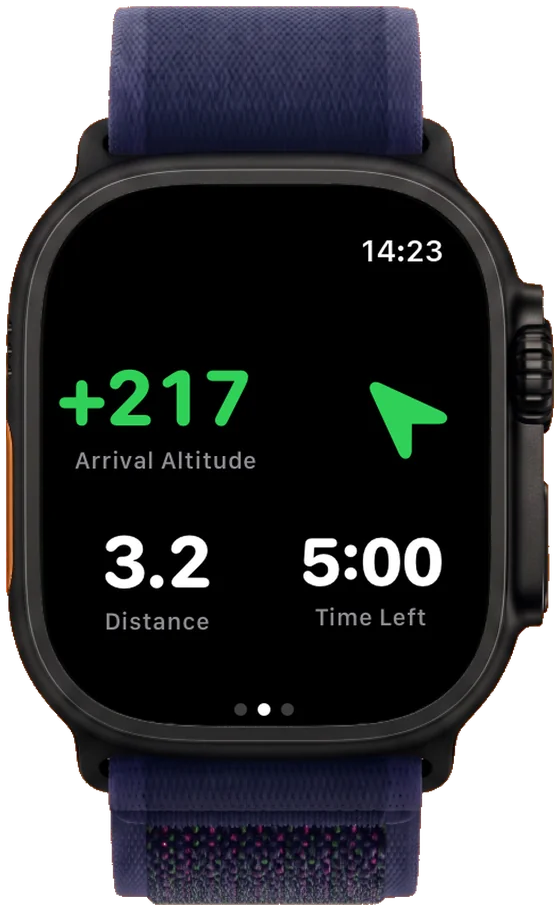
SimpleVario final glide display on Apple Watch Ultra: arrival altitude, distance and remaining flight time to the landing spot

Final Glide

Choose your landing spot on the map, and SimpleVario works out the rest: a safe final glide, including the safety margin from your settings.
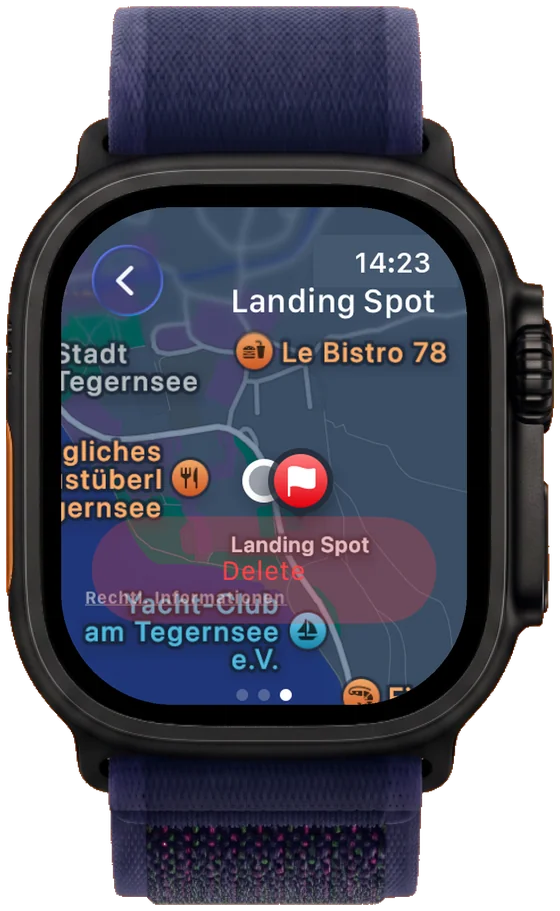
Marking the landing spot on the map

Landing Spot

Tap the map and the landing spot is marked. SimpleVario fetches the ground elevation automatically. You can move it anytime or remove it with a tap.
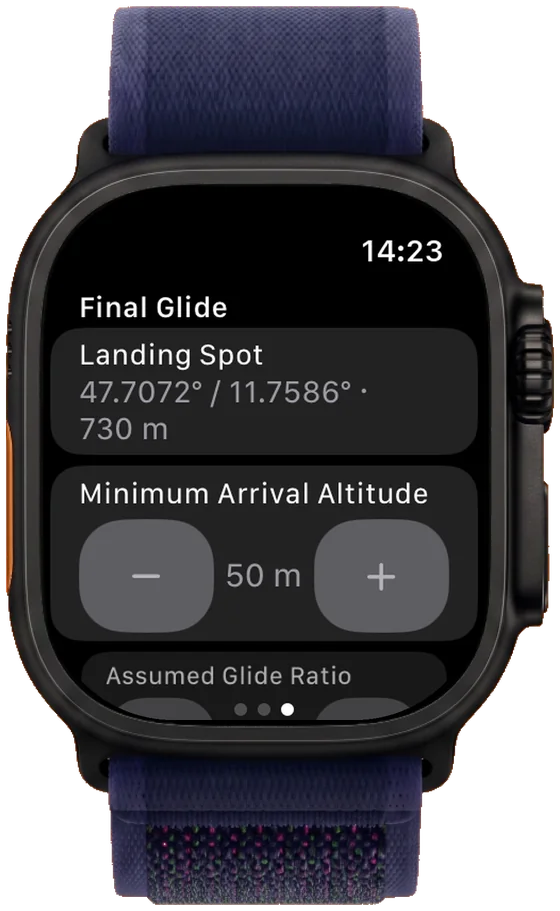
Setting the minimum arrival altitude

Minimum Arrival Altitude

Sets how much safety margin you want above the landing spot on arrival. Freely adjustable, and the basis for the final-glide alert.


What SimpleVario Does

Connects Itself

Connects automatically via Bluetooth to your vario the moment you open the app, and reconnects on its own if the link drops. You don't need a pairing menu in flight.

Everything That Matters, at a Glance

Altitude AMSL, climb/sink rate (smoothed), glide ratio, ground speed and automatically detected flight time.

Wind, Without Any Extra Sensor

Wind direction and speed are estimated directly from your circling flight in the thermal.

If Your Vario Drops Out, the Watch Takes Over

Without an external device, the watch's barometer and GPS take over automatically. You don't have to switch anything.

Works Completely Standalone

No iPhone needed during the flight. The display stays active automatically, with no setting to turn on.

Safe Final Glide

Choose your landing spot on the map, and SimpleVario calculates a safe final glide from it, safety margin included.

Who Is SimpleVario For?

01 — BEGINNER

The Beginner

Still figuring out where your flying is headed? SimpleVario is an affordable way in to gain your first experience with thermal flying, without any expensive extra device.

02 — SAFETY

The Safety-Minded

If your main vario ever fails, SimpleVario is always the backup on your wrist, to check your altitude, avoid airspace violations, and decide safely when in doubt.

03 — MINIMALIST

The Minimalist

You like it simple: no extra device, no extra weight. Just the Apple Watch you're already wearing. SimpleVario needs nothing more.

Try SimpleVario Now

Coming soon on the App Store coming soon

Compatibility

Apple Watch Compatibility

SimpleVario runs standalone on any Apple Watch from watchOS 10, with no iPhone needed while you're in the air.

  • ·Apple Watch Series 4 and later
  • ·Apple Watch SE, 1st generation and later
  • ·Apple Watch Ultra and later
  • ·GPS and GPS+Cellular models alike

Vario Bluetooth Compatibility

Connects automatically via Bluetooth – whether it has its own display or none at all:

  • XC Tracer native
  • BlueFlyVario LK8EX1
  • MipFly MipBip LK8EX1
  • Stodeus BlueBip / UltraBip LK8EX1
  • FreeFlyVario LK8EX1
  • Skybean Strato LK8EX1
  • FlyBeeper Mini BT Environmental Sensing

More variometers can be added on request.

Frequently Asked Questions

Do I need my iPhone while flying?

No. SimpleVario runs completely standalone on the Apple Watch. The Bluetooth connection to your vario, GPS and barometer all run directly on the watch, with no iPhone in the air.

Which variometers does SimpleVario support?

XC Tracer natively, plus any device using the LK8EX1 protocol (BlueFlyVario, MipFly MipBip, Stodeus BlueBip/UltraBip, FreeFlyVario, Skybean Strato) and FlyBeeper Mini BT via the Environmental Sensing profile. More devices on request.

What happens if no external vario is connected?

SimpleVario also works without an external device: the Apple Watch's barometer and GPS automatically take over climb/sink rate and altitude.

Which Apple Watch do I need?

Any Apple Watch from watchOS 10: Series 4 and later, SE 1st generation and later, Ultra and later, GPS and GPS+Cellular models alike.

Does SimpleVario calculate a final glide?

Yes. Mark your landing spot on the map, and SimpleVario calculates a safe final glide from it, including the minimum arrival altitude from your settings.

Does SimpleVario store my flight data?

No. There's no flight data storage at all, every value is shown live and discarded when you close the app. The only exception is your settings (paired device, landing spot).

The Inventor of the Electronic Vario

Ingo Westerboer
Ingo Westerboer

Ingo Westerboer invented the electronic variometer: the typical beeps for climbing and sinking that every vario still makes today trace back to him. He was himself a passionate hang glider and glider pilot, and it was with him that I got to learn gliding.

About Me

Christian launching his paraglider in the Dolomites
Christian in the cockpit of his glider
Christian Loskarn

I'm a passionate glider and paraglider pilot who simply loves being in the air – or maybe I just watched a bit too much Peter Pan as a kid.